You spent $247 at Costco.
On what?
Find the $200 a month you can’t explain. The closest thing to a personal bookkeeper that lives on your laptop.
Freemium model · No credit card · Bank login stays with you
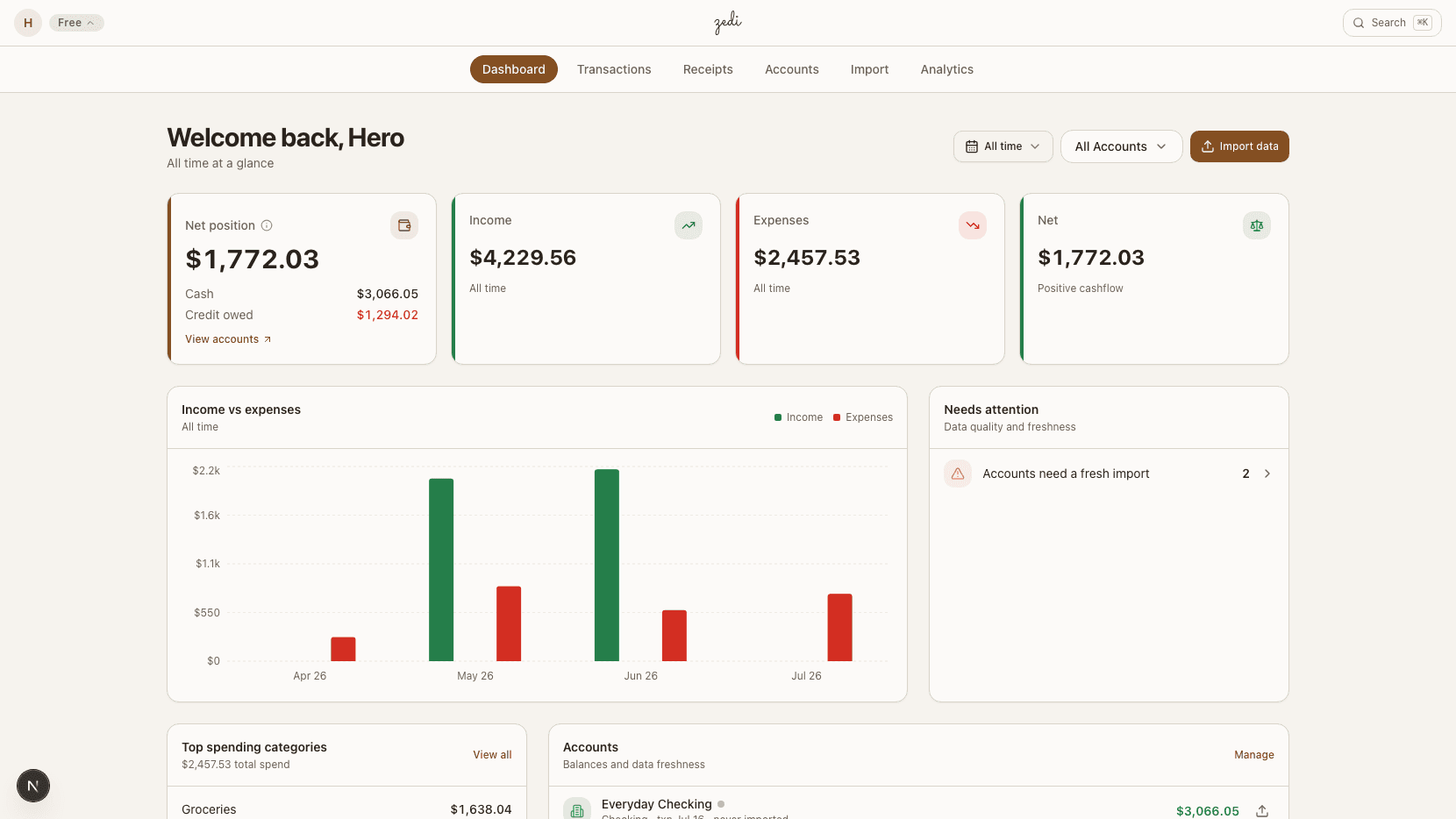
Upload a file from your bank, or sync read-only through SimpleFIN with a token you create there. No Plaid, no credentials shared with Zedi.
TLS everywhere. Per-user database isolation enforced at the row level.
No ads, no trackers, no resold analytics. Your transactions stay yours.

“Zedi runs on my own banking before anyone else’s. The product has to work for me, every day, before I ask anyone else to trust it.”
Receipt photos and bank PDFs are both sent to Claude Vision for OCR. CSV and QFX files are parsed locally on our server.
Bank statements were written for accountants, not for you.
Every personal-finance app reads the same boring data your bank gives them: a merchant name and a number. None of them open the receipt that’s sitting in your camera roll.
What you actually get when you sign up.
Four capabilities, all of which exist in the app today. Not a roadmap, not a teaser, not a waitlist.
Receipt itemization, line by line
Snap a photo of a receipt and Claude Vision reads it back as a structured list: store, date, every product, every price, sales tax. Each line item can be categorized independently, so the $32 ribeye lands in Meat and the $22 paper towels land in Household, instead of $247 of "Costco".
COSTCO #0428 becomes 18 items across 7 categories.
Group transactions, merge duplicates, trim shared charges
Imports across CSV, QFX, and PDF dedupe automatically (SHA256 fingerprints for CSV, FITID for QFX, file-hash for PDFs). Venmo CSV exports import too: each payment is matched to the person on the other side, and names Zedi does not know yet wait in a review tray. When a roommate Venmos you back for half of dinner, trim the original charge to your share so the category totals stay honest. Bulk re-categorize when you change your mind about a rule.
Trim a $64 grocery run to your $32 share without losing the underlying record.
Time-granular views, not just a monthly total
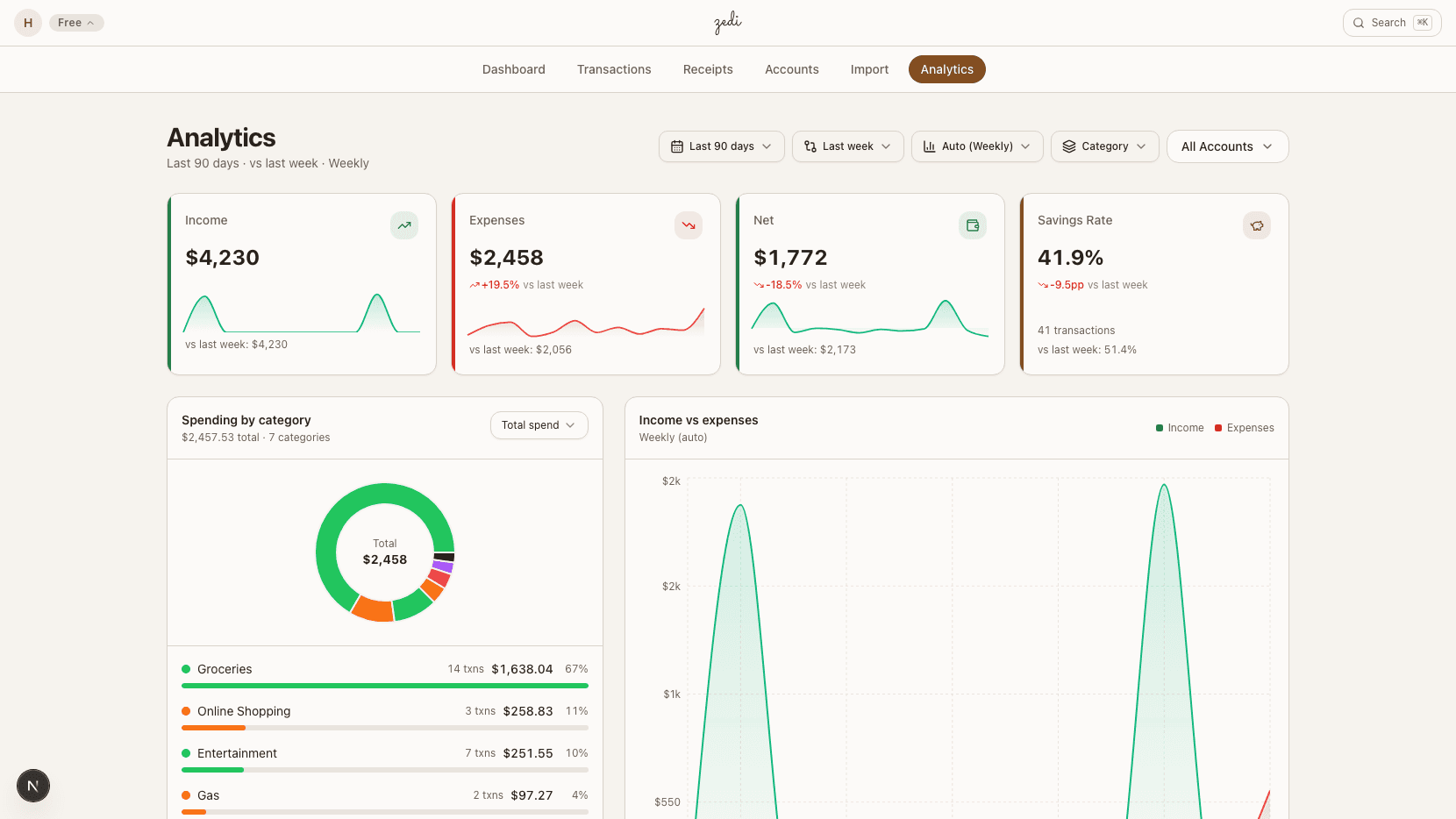
A spending heatmap colors every day of the year by how much you spent. Drill into a single day to see the underlying transactions, or zoom out to compare months. Filters compose: one account, one category, one merchant, one date range, all at once.
Spot the Tuesday you spent $312 on something you forgot you bought.
Data analytics applied to your financial life
Top merchants, category breakdowns, month-over-month deltas, rule-driven categorization that learns from your corrections. The same kind of analysis a data team would run on a company budget, run on yours. The corrections you make become rules: edit a merchant twice and Zedi will auto-categorize it next time.
450+ default merchant and keyword rules, plus everything you teach it.
Any financial artifact, any format.
Three steps, about fifteen minutes. CSV, QFX, PDF, or a receipt photo: Zedi turns them all into the same searchable, categorizable ledger.
Drop in a statement
CSV, QFX, or PDF, or sync your bank through SimpleFIN. Dedup is automatic.
Snap a receipt
Claude Vision reads every line item.
See where it went
Trends, merchants, drill-down. Corrections become rules.
Brokerage accounts
In development: import a Schwab activity or positions export and see holdings, activity, and allocation in their own view, kept apart from your spending. Other brokerages and daily pricing come after that.
Self-serve export
Download everything you have in Zedi from Settings, and close your account from the same page. Until those buttons ship, email zedi@sneeks.ai and both come back within a day.
Cash App statements
Planned: import the CSV Cash App exports from its web activity page, so payments to friends land on the People tab and cash-outs pair with your bank instead of counting twice.
Forward by email
One private inbound address for your whole account, not one per bank. Forward a statement or a digital receipt straight from your inbox and Zedi files it to the right account; useful for statements that never touch a download folder.
How Zedi compares, line by line.
Six honest questions, answered for the apps people actually consider when they leave Mint. No vague “typical app” hand-waving.
Sources: each competitor’s pricing page, privacy policy, and 2026 release notes. We picked four apps people most often consider after Mint shut down. If a row says no, it’s because the public docs say no, not because we wanted to win it.
I built Zedi for my own banking, before anyone else’s.
The personal finance platform market is flooded with one thing in common... all typically around 90 dollars a year for a mature product, with deep pocketed investors looking for year over year growth. Untrustworthy and subject to price hikes. I did not want that arrangement for my own financial data, so I built Zedi as the personal-finance app I would use myself. I built Zedi for ownership and privacy in mind. Public signups only opened because of my IME 543 Human Factors and Ergonomics class with Dr. Duha Ali gave me the opportunity to turn the tool I was already using every day into a platform I could share with friends, family, and hopefully some people who want a better financial experience. It has to be good enough for me to trust with my own data before I ask anyone else to trust it with theirs.
Scale is not security. A consumer fintech app with millions of users is a larger target with a wider attack surface and a longer chain of people, services, and automated pipelines that touch your data on its way through. The number those companies will never publish on a landing page is how many of those people and systems actually have access to your records, and how many of them can identify a user’s habits from what they see. For Zedi, that number is one, and it is me. For everyone else it sits somewhere between “we won’t say” and an acquisition deck.
My background is industrial engineering, with concentrations in computer-science development, statistics, data analytics, and a cybersecurity-first approach to building software. I wrote the Rust backend. Rust is the memory-safe systems language behind Cloudflare, Discord, and a lot of modern security-critical infrastructure, picked specifically because the bugs that leak user data are hard to write in it. I wrote the Postgres database with row-level isolation policies that scope every single query to your user id at the database layer itself, not in application code where a forgotten check could expose another customer’s row. I wrote the Cloudflare R2 storage layer, and the Anthropic OCR pipeline that deletes your receipt image the instant the line items are parsed. I read every line of all of it, because I am the one who answers the email when it breaks.
Personal privacy is not a feature I bolted on for marketing. It is the reason this app exists at all. I built the version of a finance tool I would actually trust with my own data, and the only honest way to ship it is to give other people that same version, on the same code, with the same posture.
If anything in the data policy or the comparison table above is unclear, email zedi@sneeks.ai and I will answer it personally. There is no support team to forward it to.
Your money,
shown only to you.
Most personal-finance tools are advertising businesses with a finance hobby. Zedi is the inverse: a finance tool with zero ads, zero data brokers, and zero shareholders to sell to.
- 0
- advertiser deals
- 0
- third-party trackers
- 0
- receipt images retained after OCR
- 1
- human with database access
Numbers are current today and updated when the underlying posture changes. The data policy at /privacy spells out the exact retention windows.
Free for most. Five bucks if you want the easy button.
CSV and QFX imports are unlimited and always free. Receipt and PDF OCR get a fresh monthly allowance on our Anthropic key, then two ways to keep going past it.
The whole product, on our key, with a fresh monthly OCR allowance so a hijacked account can’t drain the shared bill.
- Unlimited CSV and QFX imports
- 10 receipt OCRs per month
- 10 PDF statement OCRs per month
- Connect a bank through SimpleFIN and press Sync now
- Every dashboard, every category, every rule
Paste your Anthropic API key in settings. Receipt and PDF OCR bill to your Anthropic account, not ours, and the platform cap stops applying.
- Unlimited receipt and PDF OCR on your key
- Bill goes to your Anthropic account
- Remove the key any time and we revert to free
- Everything in Free
For people who want the easy button. We pay Anthropic, you upload all the receipts and statements you want.
- Unlimited receipt and PDF OCR on our key
- No second account, no API key plumbing
- Everything in Free
The 10 + 10 OCR allowance resets on the first of each month. No autobill, no surprise charges: Free stays free, BYOK stays free, and Pro is opt-in. Manage or cancel Pro any time from your settings.
Probably what you were about to ask.
Do I have to give you my bank login?+
Where does my data actually go?+
How does the free OCR allowance work?+
Can I use my own Anthropic API key?+
Can I export or delete everything?+
Is it free?+
Who is behind this?+
Stop guessing where
your money went.
Sign up takes a minute. Import your first statement in five. See your first itemized receipt today.
No credit card · Close your account anytime by emailing zedi@sneeks.ai
Read the Data Policy for what we store, where it lives, and how to delete it.